React 组件使用 props 相互通信。每个父组件都可以通过给子组件传递 props 来传递一些信息。Props 可能会让你联想到 HTML 属性,但你可以通过它们传递任何 JavaScript 值,包括对象、数组和函数。
You will learn
- 如何向组件传递 props
- 如何从组件中读取 props
- 如何为 props 指定默认值
- 如何向组件传递一些 JSX
- props 如何随时间变化
常见的 props
Props 是你传递给 JSX 标签的信息。例如,className、src、alt、width 和 height 都是你可以传递给 <img> 的一些 props:
function Avatar() {
  return (
    <img
      className="avatar"
      src="https://react.dev/images/docs/scientists/1bX5QH6.jpg"
      alt="Lin Lanying"
      width={100}
      height={100}
    />
  );
}

export default function Profile() {
  return (
    <Avatar />
  );
}
你可以传递给 <img> 标签的 props 是预先定义好的(ReactDOM 遵循 HTML 标准)。但你可以向 你自己的 组件传递任何 props,比如 <Avatar>,来定制它们。下面就是方法!
向组件传递 props
在这段代码中,Profile 组件并没有向它的子组件 Avatar 传递任何 props:
export default function Profile() {
  return (
    <Avatar />
  );
}
你可以分两步给 Avatar 传递一些 props。
第 1 步:向子组件传递 props
首先,向 Avatar 传递一些 props。例如,让我们传递两个 props:person(一个对象)和 size(一个数字):
export default function Profile() {
  return (
    <Avatar
      person={{ name: 'Lin Lanying', imageId: '1bX5QH6' }}
      size={100}
    />
  );
}现在你就可以在 Avatar 组件内部读取这些 props 了。
第 2 步:在子组件内部读取 props
你可以通过在 function Avatar 后面的 ({ 和 }) 内部,直接用逗号分隔列出它们的名字 person, size 来读取这些 props。这样你就可以像使用变量一样在 Avatar 代码中使用它们。
function Avatar({ person, size }) {
  // person 和 size 在这里可用
}
给 Avatar 添加一些使用 person 和 size props 来进行渲染的逻辑,就完成了。
现在你可以用不同的 props 将 Avatar 配置成多种不同的渲染方式。试着调整这些值!
import { getImageUrl } from './utils.js';

function Avatar({ person, size }) {
  return (
    <img
      className="avatar"
      src={getImageUrl(person)}
      alt={person.name}
      width={size}
      height={size}
    />
  );
}

export default function Profile() {
  return (
    <div>
      <Avatar
        size={100}
        person={{
          name: 'Katsuko Saruhashi',
          imageId: 'YfeOqp2'
        }}
      />
      <Avatar
        size={80}
        person={{
          name: 'Aklilu Lemma',
          imageId: 'OKS67lh'
        }}
      />
      <Avatar
        size={50}
        person={{
          name: 'Lin Lanying',
          imageId: '1bX5QH6'
        }}
      />
    </div>
  );
}
Props 让你可以独立思考父组件和子组件。例如,你可以在 Profile 中更改 person 或 size props,而不必考虑 Avatar 如何使用它们。类似地,你也可以更改 Avatar 使用这些 props 的方式,而无需查看 Profile。
你可以把 props 想成可以调整的“旋钮”。它们所起的作用和函数参数一样——实际上,props 就是 传递给组件的唯一参数!React 组件函数只接受一个参数,也就是一个 props 对象:
function Avatar(props) {
  let person = props.person;
  let size = props.size;
  // ...
}
通常你不需要整个 props 对象本身,所以你会把它解构成单独的 props。
为 prop 指定默认值
如果你想在没有指定值时给某个 prop 一个回退的默认值,可以通过解构在参数后面直接写上 = 和默认值来实现:
function Avatar({ person, size = 100 }) {
  // ...
}
现在,如果渲染 <Avatar person={...} /> 时没有提供 size prop,那么 size 将被设为 100。
默认值只会在 size prop 缺失或你传递 size={undefined} 时使用。但如果你传递 size={null} 或 size={0},则不会使用默认值。
使用 JSX 扩展语法转发 props
有时候,传递 props 会变得非常重复:
function Profile({ person, size, isSepia, thickBorder }) {
  return (
    <div className="card">
      <Avatar
        person={person}
        size={size}
        isSepia={isSepia}
        thickBorder={thickBorder}
      />
    </div>
  );
}
重复的代码并没有错——它可能更易读。但有时你可能更看重简洁性。有些组件会把它们所有的 props 都转发给子组件,就像这个 Profile 对 Avatar 所做的那样。因为它们并没有直接使用任何 props,所以使用更简洁的“扩展”语法是合理的:
function Profile(props) {
  return (
    <div className="card">
      <Avatar {...props} />
    </div>
  );
}
这会把 Profile 的所有 props 转发给 Avatar,而无需逐一列出它们的名字。
请谨慎使用扩展语法。 如果你在几乎每个组件里都在用它,那就说明有问题了。通常这表示你应该拆分组件,并将 children 作为 JSX 传递。下面就会讲到!
将 JSX 作为 children 传递
在内置的浏览器标签中嵌套内容是很常见的:
<div>
  <img />
</div>
有时你也会希望以同样的方式嵌套自己的组件:
<Card>
  <Avatar />
</Card>
当你把内容嵌套在 JSX 标签内部时,父组件会在一个名为 children 的 prop 中接收这些内容。例如,下面的 Card 组件会接收一个值为 <Avatar /> 的 children prop,并将其渲染到一个包装 div 中:
import Avatar from './Avatar.js';

function Card({ children }) {
  return (
    <div className="card">
      {children}
    </div>
  );
}

export default function Profile() {
  return (
    <Card>
      <Avatar
        size={100}
        person={{
          name: 'Katsuko Saruhashi',
          imageId: 'YfeOqp2'
        }}
      />
    </Card>
  );
}
试着把 <Card> 里的 <Avatar> 替换成一些文本,看看 Card 组件如何包装任何嵌套内容。它不需要“知道”内部渲染的是什么。你会在很多地方看到这种灵活的模式。
你可以把带有 children prop 的组件想象成有一个“洞”,这个“洞”可以被父组件用任意 JSX “填充”。你会经常将 children prop 用于视觉上的包装组件:面板、网格等等。
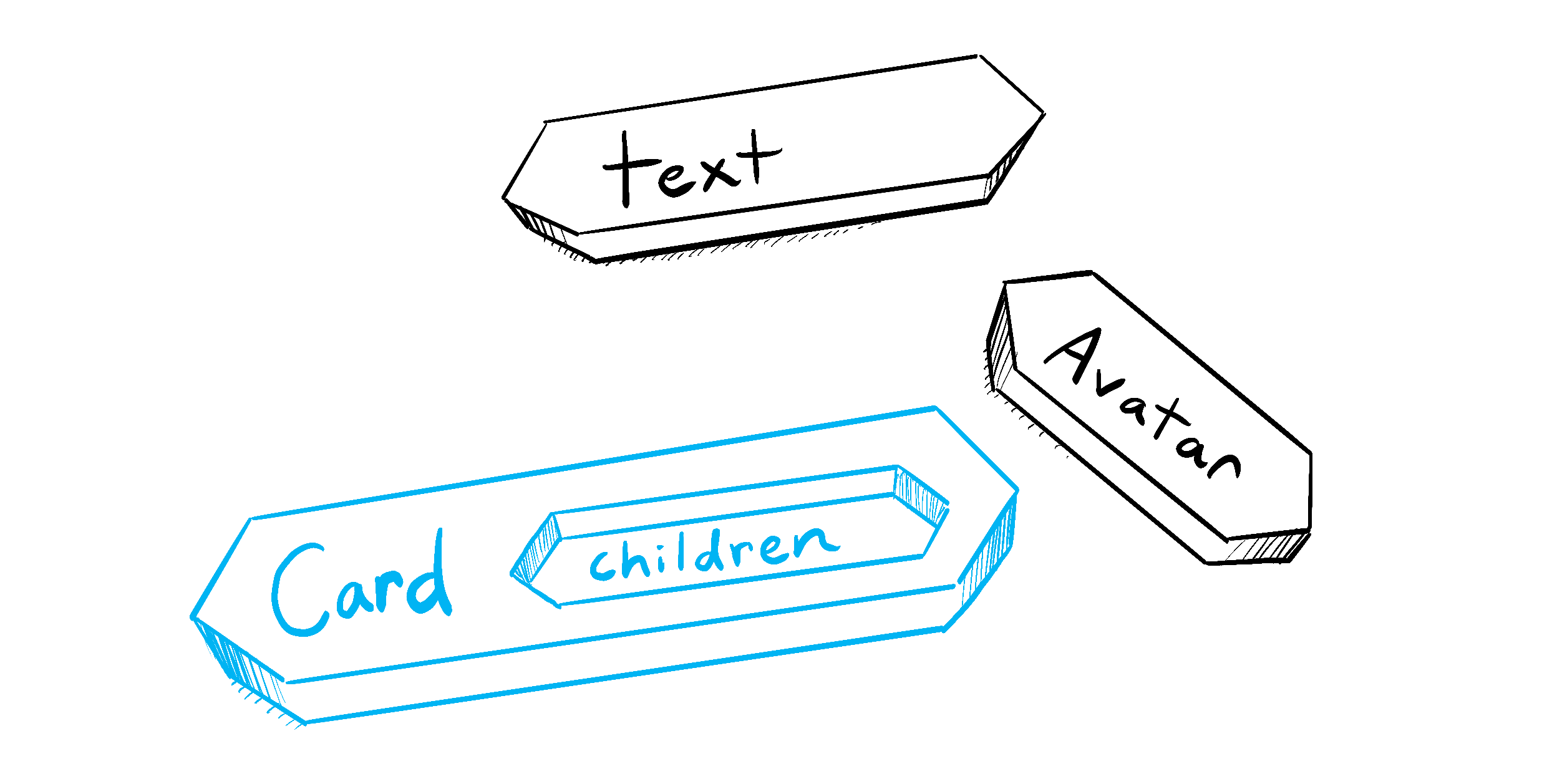
Illustrated by Rachel Lee Nabors
props 如何随时间变化
下面的 Clock 组件从父组件接收两个 props:color 和 time。(父组件的代码被省略了,因为它使用了 state,我们暂时还不会深入讨论。)
试着在下面的选择框中更改颜色:
export default function Clock({ color, time }) {
  return (
    <h1 style={{ color: color }}>
      {time}
    </h1>
  );
}
这个例子说明,组件可能会随着时间接收到不同的 props。 Props 并不总是静态的!这里,time prop 每秒都会变化,而 color prop 会在你选择另一个颜色时变化。Props 反映的是组件在任意时刻的数据,而不只是开始时的数据。
不过,props 是 不可变的——这是计算机科学中的一个术语,意思是“不可改变的”。当组件需要改变它的 props 时(例如,为了响应用户交互或新数据),它必须“请求”父组件传递给它 不同的 props——一个新的对象!然后旧的 props 会被丢弃,最终由 JavaScript 引擎回收它们占用的内存。
不要试图“改变 props”。 当你需要响应用户输入(比如更改选中的颜色)时,你需要“设置 state”,你可以在 State:组件的记忆。 中了解它。
Recap
- 要传递 props,只需像使用 HTML 属性那样把它们添加到 JSX 中。
- 要读取 props,使用
function Avatar({ person, size })这种解构语法。 - 你可以指定默认值,比如
size = 100,它会用于缺失和undefined的 props。 - 你可以使用
<Avatar {...props} />这种 JSX 扩展语法转发所有 props,但不要过度使用! - 像
<Card><Avatar /></Card>这样的嵌套 JSX 会作为Card组件的childrenprop 出现。 - Props 是时间上的只读快照:每次渲染都会接收到一版新的 props。
- 你不能改变 props。当你需要交互性时,你需要设置 state。
Challenge 1 of 3: 提取组件
这个 Gallery 组件中包含两个人物简介的非常相似的标记。把其中的 Profile 组件提取出来,以减少重复。你需要决定向它传递哪些 props。
import { getImageUrl } from './utils.js';

export default function Gallery() {
  return (
    <div>
      <h1>Notable Scientists</h1>
      <section className="profile">
        <h2>Maria Skłodowska-Curie</h2>
        <img
          className="avatar"
          src={getImageUrl('szV5sdG')}
          alt="Maria Skłodowska-Curie"
          width={70}
          height={70}
        />
        <ul>
          <li>
            <b>Profession: </b>
            physicist and chemist
          </li>
          <li>
            <b>Awards: 4 </b>
            (Nobel Prize in Physics, Nobel Prize in Chemistry, Davy Medal, Matteucci Medal)
          </li>
          <li>
            <b>Discovered: </b>
            polonium (chemical element)
          </li>
        </ul>
      </section>
      <section className="profile">
        <h2>Katsuko Saruhashi</h2>
        <img
          className="avatar"
          src={getImageUrl('YfeOqp2')}
          alt="Katsuko Saruhashi"
          width={70}
          height={70}
        />
        <ul>
          <li>
            <b>Profession: </b>
            geochemist
          </li>
          <li>
            <b>Awards: 2 </b>
            (Miyake Prize for geochemistry, Tanaka Prize)
          </li>
          <li>
            <b>Discovered: </b>
            a method for measuring carbon dioxide in seawater
          </li>
        </ul>
      </section>
    </div>
  );
}