将你的 UI 视为一棵树

你的 React 应用正在逐步成形,许多组件彼此嵌套在一起。React 是如何跟踪你应用的组件结构的呢?

React 和许多其他 UI 库一样,都将 UI 建模为一棵树。把你的应用想象成一棵树,有助于理解组件之间的关系。这种理解将帮助你调试未来的一些概念,比如性能和状态管理。

You will learn

  • React 是如何“看到”组件结构的
  • 什么是渲染树,以及它有什么用
  • 什么是模块依赖树,以及它有什么用

你的 UI 作为一棵树

树是一种描述项目之间关系的模型。UI 通常使用树结构来表示。例如,浏览器使用树结构来建模 HTML (DOM) 和 CSS (CSSOM)。移动平台也使用树来表示它们的视图层级。
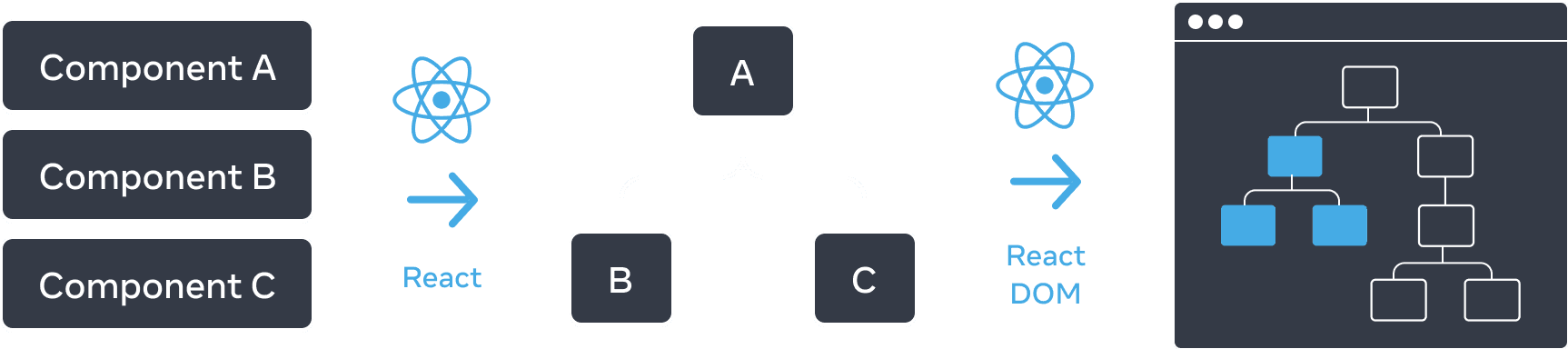
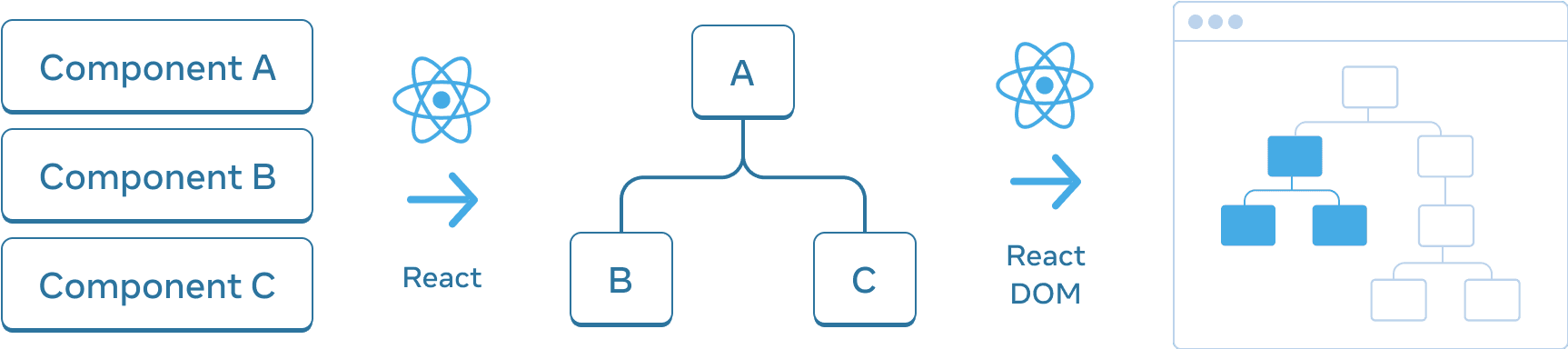
Diagram with three sections arranged horizontally. In the first section, there are three rectangles stacked vertically, with labels 'Component A', 'Component B', and 'Component C'. Transitioning to the next pane is an arrow with the React logo on top labeled 'React'. The middle section contains a tree of components, with the root labeled 'A' and two children labeled 'B' and 'C'. The next section is again transitioned using an arrow with the React logo on top labeled 'React DOM'. The third and final section is a wireframe of a browser, containing a tree of 8 nodes, which has only a subset highlighted (indicating the subtree from the middle section).

React 会根据你的组件创建一棵 UI 树。在这个例子中,这棵 UI 树随后被用来渲染到 DOM。

和浏览器以及移动平台一样,React 也使用树结构来管理并建模 React 应用中组件之间的关系。这些树是理解数据如何在 React 应用中流动,以及如何优化渲染和应用体积的有用工具。

渲染树

组件的一个主要特性是能够组合其他组件。随着我们嵌套组件,就会有父组件和子组件的概念,其中每个父组件本身也可能是另一个组件的子组件。

当我们渲染一个 React 应用时,我们可以把这种关系建模为一棵树,这棵树被称为渲染树。

下面是一个渲染激励人心语录的 React 应用。

import FancyText from './FancyText';
import InspirationGenerator from './InspirationGenerator';
import Copyright from './Copyright';

export default function App() {
  return (
    <>
      <FancyText title text="Get Inspired App" />
      <InspirationGenerator>
        <Copyright year={2004} />
      </InspirationGenerator>
    </>
  );
}
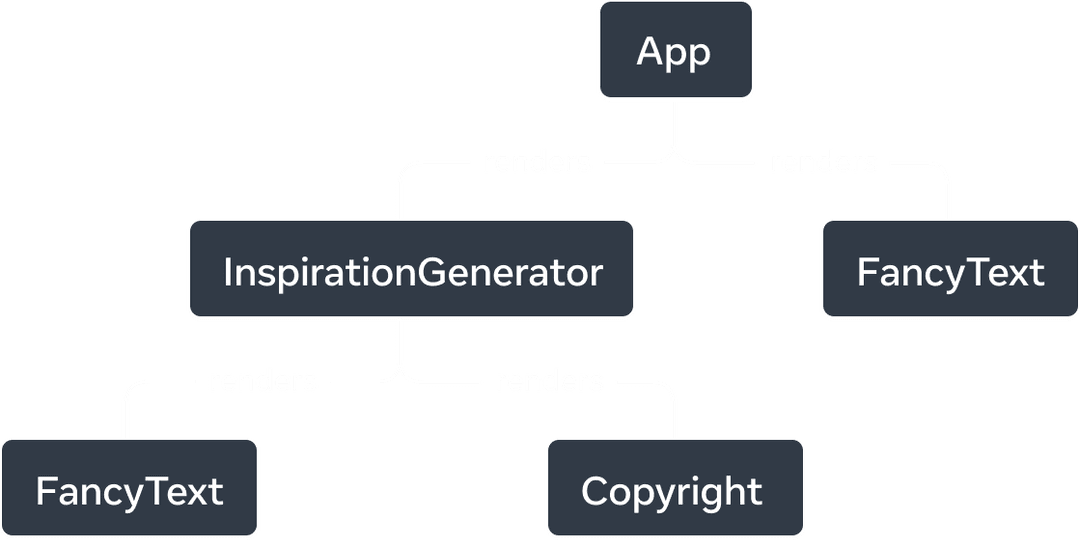
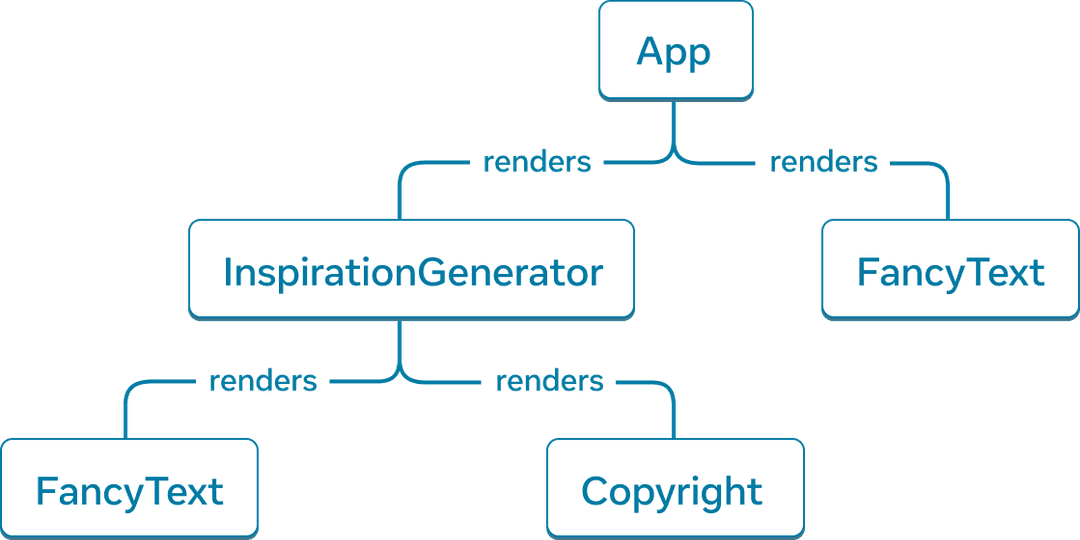
Tree graph with five nodes. Each node represents a component. The root of the tree is App, with two arrows extending from it to 'InspirationGenerator' and 'FancyText'. The arrows are labelled with the word 'renders'. 'InspirationGenerator' node also has two arrows pointing to nodes 'FancyText' and 'Copyright'.

React 创建了一棵 渲染树,也就是由已渲染组件组成的 UI 树。

根据这个示例应用,我们可以构建出上面的渲染树。

这棵树由多个节点组成,每个节点都表示一个组件。AppFancyTextCopyright,仅举几例,都是这棵树中的节点。

React 渲染树中的根节点是应用的根组件。在这个例子中,根组件是 App,它是 React 首先渲染的组件。树中的每个箭头都从父组件指向子组件。

Deep Dive

渲染树中 HTML 标签在哪里?

你会注意到上面的渲染树中,并没有提到每个组件所渲染的 HTML 标签。这是因为渲染树只由 React 的组件组成。

React 作为一个 UI 框架,与平台无关。在 react.dev 上,我们展示的是渲染到 Web 的示例,而 Web 使用 HTML 标记作为其 UI 基元。但 React 应用同样也可能渲染到移动端或桌面端平台,而这些平台可能使用不同的 UI 基元,比如 UIViewFrameworkElement

这些平台 UI 基元并不是 React 的一部分。无论你的应用渲染到哪个平台,React 渲染树都能为我们的 React 应用提供洞察。

渲染树表示 React 应用的一次单独渲染过程。借助条件渲染,父组件可以根据传入的数据渲染不同的子组件。

我们可以更新这个应用,使其有条件地渲染一条励志语录或一种颜色。

import FancyText from './FancyText';
import InspirationGenerator from './InspirationGenerator';
import Copyright from './Copyright';

export default function App() {
  return (
    <>
      <FancyText title text="Get Inspired App" />
      <InspirationGenerator>
        <Copyright year={2004} />
      </InspirationGenerator>
    </>
  );
}
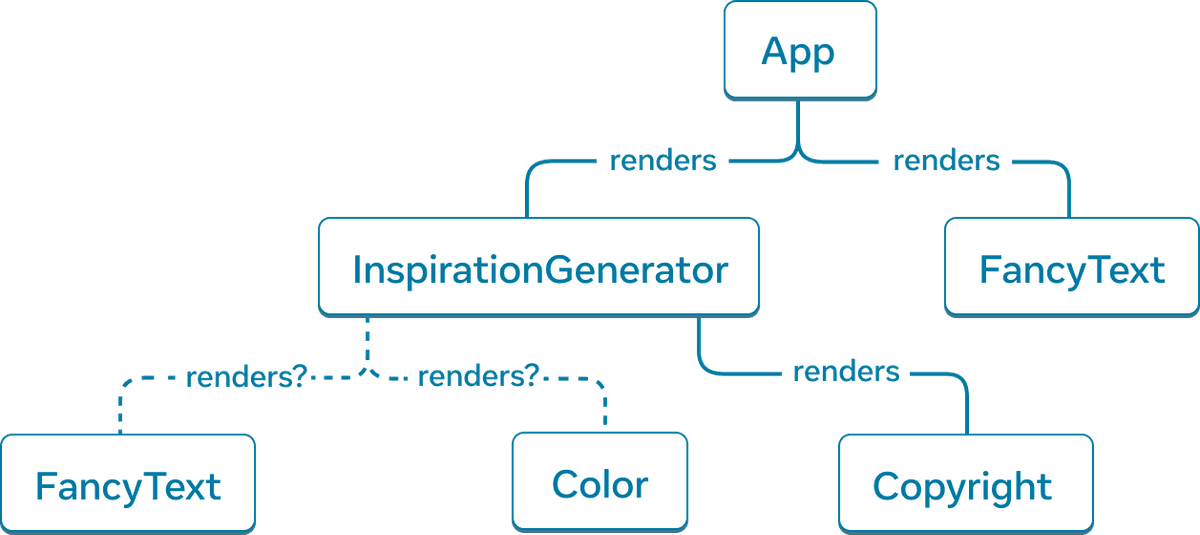
Tree graph with six nodes. The top node of the tree is labelled 'App' with two arrows extending to nodes labelled 'InspirationGenerator' and 'FancyText'. The arrows are solid lines and are labelled with the word 'renders'. 'InspirationGenerator' node also has three arrows. The arrows to nodes 'FancyText' and 'Color' are dashed and labelled with 'renders?'. The last arrow points to the node labelled 'Copyright' and is solid and labelled with 'renders'.

在条件渲染下,不同的渲染过程中,渲染树可能会渲染不同的组件。

在这个例子中,根据 inspiration.type 的值不同,我们可能渲染 <FancyText><Color>。每次渲染过程中的渲染树都可能不同。

尽管渲染树在不同的渲染过程中可能会有所不同,但这类树通常有助于识别 React 应用中的顶层组件叶子组件。顶层组件是最接近根组件的组件,会影响其下方所有组件的渲染性能,而且通常包含最多的复杂性。叶子组件位于树的底部,没有子组件,而且通常会频繁重新渲染。

识别这些组件类别有助于理解应用中的数据流和性能。

模块依赖树

React 应用中的另一种可以用树来建模的关系是应用的模块依赖关系。随着我们将 组件拆分 和逻辑拆分到不同文件中,我们会创建 JS 模块,并可以在其中导出组件、函数或常量。

模块依赖树中的每个节点都是一个模块,每一条分支代表该模块中的一条 import 语句。

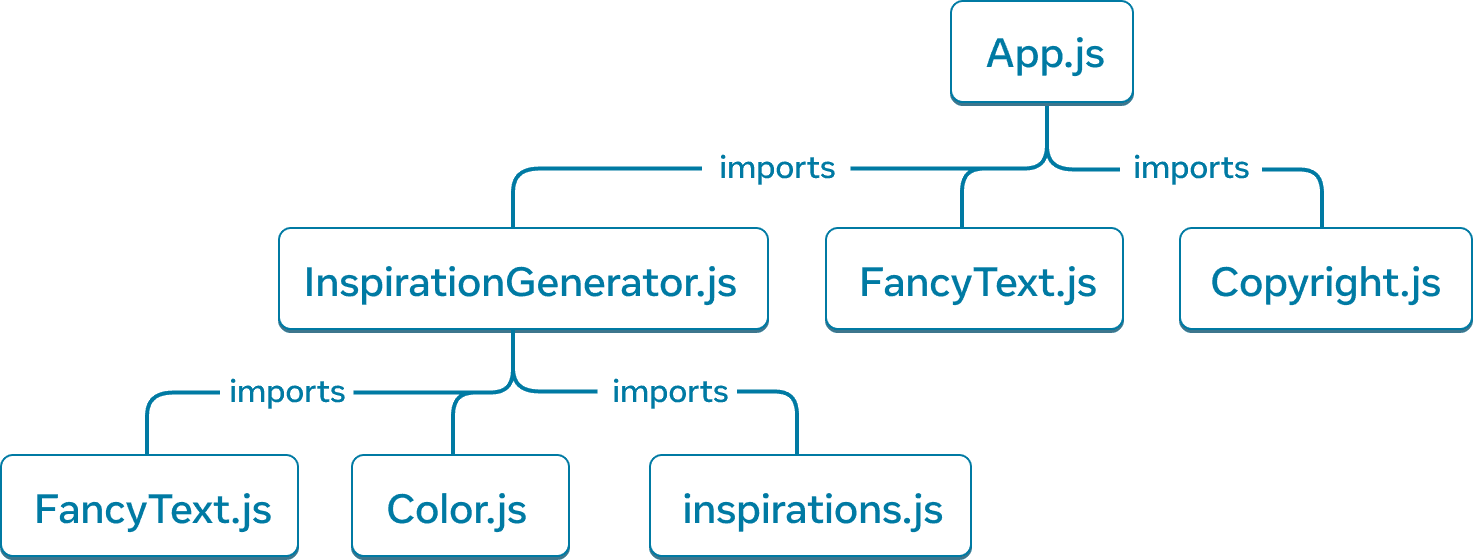
如果我们以之前的 Inspirations 应用为例,就可以构建一棵模块依赖树,简称依赖树。
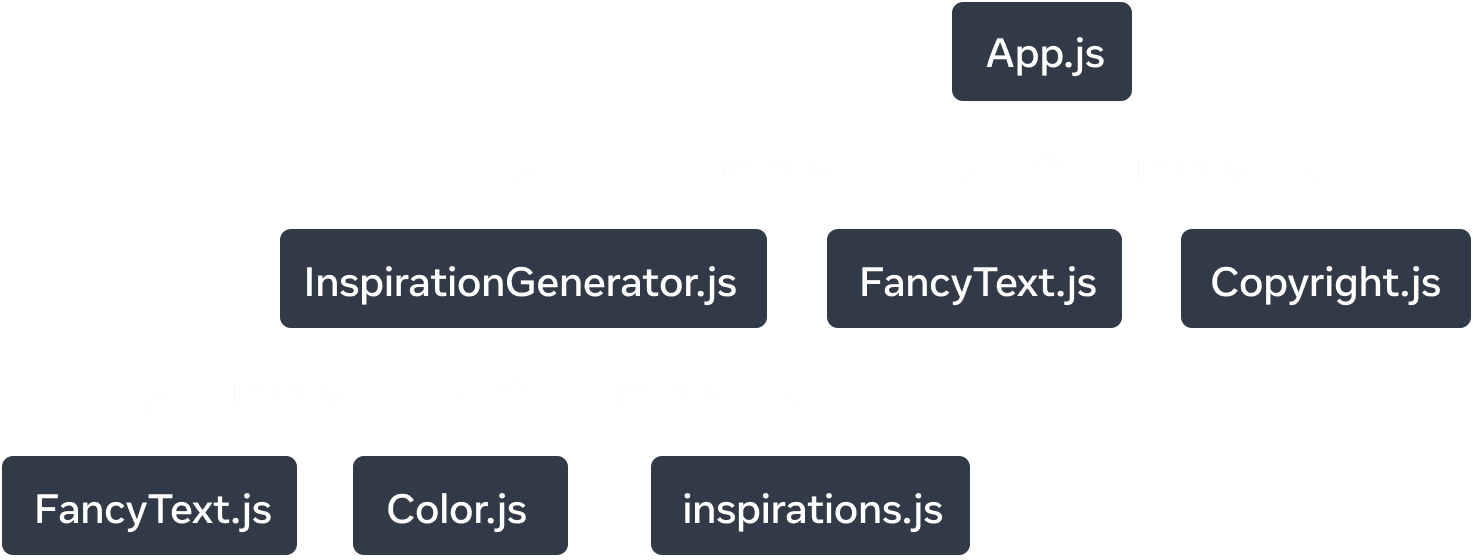
一棵有七个节点的树状图。每个节点都标注了一个模块名。树的顶层节点标注为 'App.js'。有三条箭头指向模块 'InspirationGenerator.js'、'FancyText.js' 和 'Copyright.js',箭头上标注着 'imports'。从 'InspirationGenerator.js' 节点出发,有三条箭头延伸到三个模块:'FancyText.js'、'Color.js' 和 'inspirations.js'。箭头上标注着 'imports'。

Inspirations 应用的模块依赖树。

树的根节点是根模块,也称为入口文件。它通常是包含根组件的模块。

与同一个应用的渲染树相比,它们有相似的结构,但也有一些显著差异:

  • 构成这棵树的节点表示的是模块,而不是组件。
  • 非组件模块,例如 inspirations.js,也会出现在这棵树中。渲染树只包含组件。
  • Copyright.js 出现在 App.js 下面,但在渲染树中,组件 Copyright 则作为 InspirationGenerator 的子节点出现。这是因为 InspirationGenerator 接受 JSX 作为 children props,因此它会将 Copyright 作为子组件渲染,但并不会导入该模块。

依赖树有助于确定运行你的 React 应用所必需的模块。在构建用于生产环境的 React 应用时,通常会有一个构建步骤把所有必要的 JavaScript 打包后交付给客户端。负责这项工作的工具称为 bundler,而 bundler 会使用依赖树来确定应该包含哪些模块。

随着应用不断增长,打包体积也常常会随之增大。对于客户端来说,较大的包体积下载和运行成本都很高,也会延迟 UI 的绘制时间。了解应用的依赖树有助于调试这些问题。

Recap

  • 树是一种表示实体之间关系的常见方式。它们常用于建模 UI。
  • 渲染树表示单次渲染过程中 React 组件之间的嵌套关系。
  • 在条件渲染下,渲染树可能会在不同渲染之间发生变化。随着不同的属性值,组件可能会渲染不同的子组件。
  • 渲染树有助于识别顶层组件和叶子组件。顶层组件会影响其下方所有组件的渲染性能,而叶子组件通常会被频繁重新渲染。识别它们有助于理解和调试渲染性能。
  • 依赖树表示 React 应用中的模块依赖关系。
  • 构建工具会使用依赖树来打包并交付应用所需的代码。
  • 依赖树有助于调试导致首屏绘制变慢的大体积打包文件,并发现可以优化打包代码的机会。